During the final months of my work with eBay Desktop, my sights were set squarely on optimization, both memory and cpu. When it came time to start messing with the garbage collector, my sanity went from bad to worse. What I originally thought was going to be a straightforward way of releasing memory in AIR turned into a 2 month long testcase with some discouraging outcomes.
Memory usage in eBay Desktop was something that always lingered in the back of my mind during the entire development cycle. Because of the shifting nature of our requirements, the issue was only explored near the end, even though we knew in the beginning that memory usage had to go through valleys and peaks in a managed way while users spent time in it throughout the day. We had alerts that would open and close, we had an app that would run in the system tray, and we considered making a ‘lite’ mode that would sit on top of your desktop all day, each of which had different memory requirements. In the beginning we used a well known hack to test garbage collection until part way through the development of AIR and Flex 3 Adobe finally added support for calling the garbage collector directly. We knew at this point we had a viable route for managing memory since Adobe was now making the effort to acknowledge the need. So now all that was required was a simple call to
flash.system.System.gc()
and we were set to go….right?
Well, not exactly. First off we learned that a call to System.gc() only does a mark OR a sweep on any given object, but not both in the same call. So in order to have the effect of releasing memory back to the OS, we needed to call it twice in a row. One call to mark any dereferenced objects and sweep away old marks, and the second to now sweep away marks from the first call.
flash.system.System.gc();
flash.system.System.gc();
Now this seemed to be releasing memory back with pretty basic test cases, but it wasn’t working under production scenarios and we had to turn to Adobe engineers to help with the problem. What we learned was that you have to contend with 2 different kinds of pointers when working in AS3; pointers that exist in bytecode, and pointers that *may* exist in the Flash player itself that you’d never know about. What I started to realize was that the Flash player was never really engineered to be aggressive about memory usage. It was designed to plug memory leaks and manage memory plateaus, but not designed with an assumption that users would be interested in lowering those plateaus. It makes sense because most Flash content is viewed in the browser for a short amount of time before the plugin is destroyed and all memory is released when a user navigates away. With AIR, the rules changed since users are more conscience of discreet application memory usage and applications might not always need the same memory when launched vs after 2 hours of usage.
First up we found that the Flash player was always maintaining a reference to the last Sprite clicked, so if you destroyed an AIR window that the users had interacted with, you couldn’t get garbage collection to work until interacting with another window, which can become a big problem if you’re running in system tray mode and there are no windows to click in. Secondly we learned that you have to push any existing enterframe handler off the call stack by creating a new one. Adobe took care of the first problem, but to handle the second one we had to change our GC call a bit.
private var gcCount:int;
private function startGCCycle():void{
	gcCount = 0;
	addEventListener(Event.ENTER_FRAME, doGC);
}
private function doGC(evt:Event):void{
	flash.system.System.gc();
	if(++gcCount > 1){
		removeEventListener(Event.ENTER_FRAME, doGC);
	}
}
Another facet we hadn’t considered was the affects of the Flex framework on garbage collection. Flex kept some of the same design philosophy as the player itself, mainly that end users were loading applications in the browser and then navigating away when done. Garbage collection was therefore considered on a micro level involving user components, but not at the framework level which could be guaranteed to exist throughout the life of the app. Adobe made strides on patching the framework to work better in discreet Windows, but ultimately some things couldn’t be changed. What we found was that CSS could not be defined in any <mx:Window> component. It had to be defined in the root <mx:WindowedApplication> which would take care of declaring CSS globally for all windows. Also we were forced to clear some global variables ourselves, which caused our code to now look like this.
private var gcCount:int;
private function startGCCycle():void{
	ContainerGlobals.focusedContainer = this;
	gcCount = 0;
	addEventListener(Event.ENTER_FRAME, doGC);
}
private function doGC(evt:Event):void{
	flash.system.System.gc();
	if(++gcCount > 1){
		removeEventListener(Event.ENTER_FRAME, doGC);
	}
}
Lastly, not all features in AIR could be unhooked with our enterFrame trick, after another couple days of testing we found components that needed to be unhooked with Timers like the HTML component. One last tweak to our garbage collection cycle and we were home free.
private var gcCount:int;
private function startGCCycle():void{
	gcCount = 0;
	addEventListener(Event.ENTER_FRAME, doGC);
}
private function doGC(evt:Event):void{
	flash.system.System.gc();
	if(++gcCount > 1){
		removeEventListener(Event.ENTER_FRAME, doGC);
		setTimeout(lastGC, 40);
	}
}
private function lastGC():void{
	flash.system.System.gc();
}
We were now able to successfully garbage collect any objects that have been dereferenced in Flash. We had three things we had to look out for in the app now.
- All display objects that added listeners on to model data had to be weakly referenced or they wouldn’t be automatically dereferenced. This is because our architecture kept model data alive while individual window stages were being destroyed. I feel like I should point out that contrary to some beliefs, it is not a good idea to apply weak references by default throughout your entire app. Trust me when I say that its alot easier to debug an application with memory leaks due to strong listeners, then it is to debug an app in which users report random failures because underneath the hood weakly referenced objects are getting accidentally destroyed when the GC kicks in. You can never avoid bugs, so you should program in a way that makes them consistent to find.
- All asynchronous events needed to be explicitly shut down. This included Timers, Loaders, File and DB transactions. Setting these to be weakly referenced is not enough as all asyncronous objects in AS3 register themselves to the Flash player while they are running. It is impossible to access objects that have been dereferenced in code but continue to be referenced by the player like a running timer.
- No anonymous closures allowed.
After all this was taken care of we began to learn that garbage collecting objects in Flash didn’t translate so easily to releasing memory back to the OS. If you ever look at the memory graph in the Flex debugger and then open up the Task Manger or Activity Monitor to compare memory usage, you’ll notice a huge disparity between the two.

FlexBuilder reports only 15mb of AS3 object data
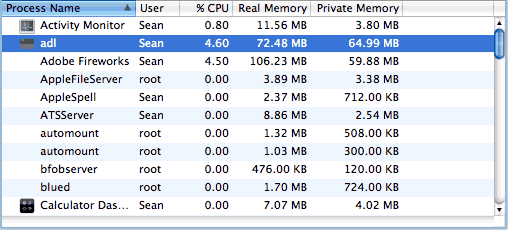
AIR private memory really takes up 65mb on the system
The difference you’re seeing is Object Memory vs. Rendering Memory and the bulk of all memory used by the Flash player goes toward rendering. Displaying an empty stage in Flash can take up anywhere between 10mb and 20mb depending on the width and height and then it climbs by roughly 4k for each display object attached to the stage. This can add up quickly when using the Flex framework where even a simple button uses several display objects.
What we ultimately found was that even though we could successfully release AS3 objects, we couldn’t reliably get the Flash player to release render data. So an app that started at 20mb would climb to 100mb, and when the entire stage was destroyed, we’d go back down to only 80mb. You can actually test this for yourself by downloading a sample Flex 3 project and observing the effects. What I’ve learned from Adobe is that the player ends up fragmenting memory quite a bit. It probably goes back to the heart of the initial design of the Flash player I described above. All the effort was put into making a killer GUI environment that deferred memory management to whether the browser window was open or not, and as a result the memory system was not optimized for more aggressive use cases. I can only guess the problem comes from the fact that AS3 code is attached to the timeline of the player itself, and managed by the elastic racetrack. As a result both AS3 objects and render data get mixed in to the same memory page, and releasing just the render data doesn’t matter when model data is placed on the same page.
Adobe has assured me they are working on the problem but it realistically won’t make it in until after AIR 2.0, and its unclear whether those fixes will be merged into the the plugin player given that the need isn’t very high for web pages. Until then, you can not count on creating an application in AIR that releases memory back to the OS. The best approach is to reuse the smallest amount of displayobjects possible to achieve the desired workflow. Get used to adding and removing children without destroying them but instead sliding them off into a pool for later reuse, as this helps keep the memory plateau low during use.
Interesting read..
Those last 2 months must have been painful..
Have you still included the system tray functionality, in light of the problems with not being able to manage rendering memory ?
Yeah system tray mode made it into the 1.0 product. It was really important that we include it in the launch feature set so now the team is working on lowering the overall memory footprint by finding better ways to reuse DisplayObjects.
That explains most of the effects I’m struggling with. Thank you for sharing!
Hi Sean,
Very nice feedback on your performance experience with eBay Desktop. I was actually looking for something like this, thanks.
You are totally right, Flex wasn’t initially memory oriented, Flash 9 brought performance, not memory rationals. The AIR apps’ physionomy / lifecycle are very different from their browser counterpart. I am even starting to think that AIR will never see apps expected to run for hours before shutdown. I ran all major AIR apps : ADC desktop, Google Analytics.. all are very hungry.
It is also the case of my application : http://labs.businessobjects.com/biwidget, a Widget Engine supposed to start and close with the OS. Even after cleaning, this app will never last more than 5 hours…
Do you have any bug number where we could bring our vote ?
That’s a very serious bug that should be adressed in AIR 2.0 / Flex 4.0.
{Maz}
Hi Sean,
I got the same problem with releasing memory in flash, thanks a lot for sharing your experience to confirm my question that memory issue still hanging in Flex3.
Have you see google map in flash version ?
website: http://www.flashearth.com/
This website could add/release memory by navigating the map, but the problem I saw memory still can not release totally from the beginning…
Bob, I haven’t seen that app before but it looks interesting. The best strategy I could offer for keeping memory low for that app would be to use a static number of Loaders and reuse them for new image requests.
Hi,
This all sounds to me that maybe Java still as a chance to come back as soon as people realize, that Flex/Air is not yet ready for high performance long running desktop applications.
Check my blogs at http://kohlerm.blogspot.com/ for how easy it is in Java to find memory consumption problems.
Regards,
Markus
Hey,
Got the same problem as described above. After half an hour of regular use my app got from 30 meg so 200 megs of RAM. Not a big problem some might say but one of the project goals was to keep minimum system requirements as low as possible. My Solution was a bit more the “but head” approach, but it seems to work. I had 10 huge interfaces i planed to use as symbols, in stead of using them as symbols i exported them in swf. After that using a 3rd party programing language (any OCX language dose the trick) i wrote my own projector (using Adobes OCX control). I defined my own custom fscommands. For example fscommand(“openLesson”). When the projector sees that command he unloads the OCX , loads it back again and it loads the “lessons.swf” (variable transfers trough .FlashVars property). Unloading and reloading the OCX practically closes and reopens the virtual machine, there for returning used memory to the OS.
I know it isn’t a proper solution, and probably some of you will or have come up with better ones, but it works.
Hope this post helps somebody. Best regards
“the need isn’t very high for web pages.”
Ouch! that’s not right.
Virtual Worlds keep a browser open through several environments and many many different display objects.
plus I have been reading many places that different browsers respond differently to left over data of a flash instance. Some will release the memory when you close a tab or window, others wait until every part of the browser has been shut down to release it….
One thing i would really like to see is sample files (in flash as3) of simple test cases, or a way to test if something is picked up by the garbage collector.
I was considering a possibility of a variable being null if it is unreferenced, and undefined after it gets collected… but I have been disappointed in my tests so far. I would like to break it down into a true or false situation rather than a user visually reading a chart and making a general assumption that the drop he seen was the object that is gone now.
Thanks so much for this post, i had my doubts about all the weak referencing.
We’ve developed an application for a digital signage advertising screen network. We built it on AIR 1.1 using Flash. Our application starts out at about 32MB of Ram and grows slowly more and more until it reaches the maximum capacity of the PC and then AIR crashes.
When I viewed posts on Adobe forums, Adobe’s response was always, send in a bug report. I bought their Enterprise Developer Support Program for $1495 and submitted a ticket on this and they say they only support the install and the fact that the AIR Runtime actually runs – nothing to do with the apps we program. I’m stuck – we have screens crashing and it seems I need to bail on AIR as we’ve tried what has been suggested above and still have the issue.
Can anyone help?
Brian – Maybe i should’ve phrased that differently. SWF based apps on the web are getting bigger and bigger and tighter memory control will be important. But in general, I would say this is a tiny minority in the flash landscape, and one of the reasons they still have exposed the garbage collector to that market.
Jeremy – I hear your pain there. Since you have a custom controlled use case you may benefit jumping to another platform like northcode or jester, but I don’t know enough about those platforms to give a good suggestion. I’m guessing you’re using alot of high rez images which is eating up your memory. I might suggest getting away from pointing directly to a url to load images and instead, loading them in as a bytearray, and then feeding those bytes to the image class to load, I seemto remember that workflow would unload data better.
Tecsi – Thats great advice actually. We’re looking into a very large project coming up that will most likely churn through alot of memory, and I think writing a custom ActiveX control in .NET so we can restart the VM will be our best option rather then relying on a single AIR session.
we are working on a huge web-application with very frequent xml data loading (i know amf would be much better) and we fighting with a serious memory leak. the app starts with 150mb and grows in 10 hours up to 300 mb. we already tried out a lot of different approaches and at the moment it seems that object pooling is one of the most promising techniques to reduce memory consumption.
i am not sure of some issues regarding the fragmentation of memory.
when the flashplayer demands more memory from the os it gets chunks with 4 kb size. (see: http://blogs.adobe.com/aharui/2008/09/using_the_flex_builder_3x_prof.html) These chunks are divided into same size pieces like 32 byte blocks.
I assume that theses blocks are always a number based on the power of 2 (4,16,32,…)? so there are 13 (1+2^12=4096) possible “categories†of chunks. One with only 1 byte blocks, one with 2 byte blocks, one with 4 byte blocks and so on. the flash types uint, int and Number uses 4 byte, but how is it with Stings, and Objects? I guess Strings uses 8 bit (UTF8). But how are objects and class definitions handled? Do strings always use chunks with 1 byte blocks or do they divide them up to the next highest block size depending on the length of the string? If a string has 14 chars does it then use a chunk with block size 16?
The reason for my questions is that we have started using object pooling with a few objects which are created by parsing xml data via e4x and we have got 50% less memory leakage. We have to investigate this further but I am wondering if the memory management in the flashplayer could cause our leaks?
As far as we have discovered yet e4x creates a lot of objects and strings internally which needs memory to be allocated and should be freed after parsing, but it seems that this is not cleaned up completely.
Does anyone have more information about this topic?
nicely said, I really needed this, you save me 🙂 Thanks a lot.
Great article. Explains a lot of things that I have been facing. Thank you for sharing.
Can you please throw some light on how “Adobe took care of the first problem.. “. Is it available in FP10 or as a patch to FP9?
interesting…
i recently found an awesome library that helps with these issues, CASAlib http://casalib.org/ i don’t know if you have ever heard of it, it works wonders!
you just make your CasaSprites and destroy() or removeAndDestroyChildren() recursively and just let the GC do it’s job automagically, you don’t need to force System.gc() unless you want to for debugging and proof.
hth.
This was super useful in a recent project I was working on, many thanks for putting this together.
Based on my own experience with AS3 memory management, I also have started pooling my display objects to keep memory usage small and efficient. However, I’ve recently run into a bug in AIR with pooling MovieClips.
If you have a MovieClip with multiple frames representing different states for a model object, and you grab an instance from the pool, set its frame, show it, then put it back in the pool, and repeat, you’ll see that the visual state of the MovieClip does not actually change when gotoAndStop is called. The currentFrame property changes, but the MovieClip gets “stuck” in the same visual state the whole time.
I created a simple test project that exhibits the problem here:
http://www.gabob.com/AirBug.zip
After unzipping, set your workspace in Flex Builder to the flex folder. Then you can run the flash and air versions. The flash version works fine, but the air version only shows green squares, even though the frame is switched to blue sometimes.
I’ve got a web app that quickly grows to the following size:
Profiler says:
Peak: 57m
Current: 49m
After gc, generally settles back down as it should.
System.totalMemory: 337m
Task Manager shows browser at: 840m
Not sure what I’m going to do. I’m quite sure (well, 99% sure) I don’t have any leaks as I watch the memory go up and down in the profiler as it should, but the browser just keeps going up and up and never comes down.
Really nice post. Cleared most of my doubts.
Now that AIR 2.0 is out, I’m curious if Adobe has addressed any of these concerns. I know they’ve focused much on CPU usage, but I haven’t heard nearly as much talk about memory usage…
Hi,
Very good article. Hope it helps me.
We developed a trading desktop application which runs on Adobe AIR. But memory is keep on increasing, never garbage collected. It reaches to 400MB. 🙁
Where do we need to place this code exactly? & how frequent this would be triggered?
Thanks,
Raghu.